Code Isolation: Choosing a Development Setup settled the boundaries: development runs in VMs, and the laptop keeps the interface and the administrative access. This post is about the laptop’s part in that setup. It describes the operating model I am designing toward.
Since this was written, the trading platform has become i26g, with its own i26g Control Plane. The Application Control Plane described here is my own, not a product, and runs my other workloads. The laptop now hands the trading platform an environment of its own in the same way — a boundary and one bootstrapped VM — described in Handing the Trading Platform a Boundary.
Two Roles, One Laptop
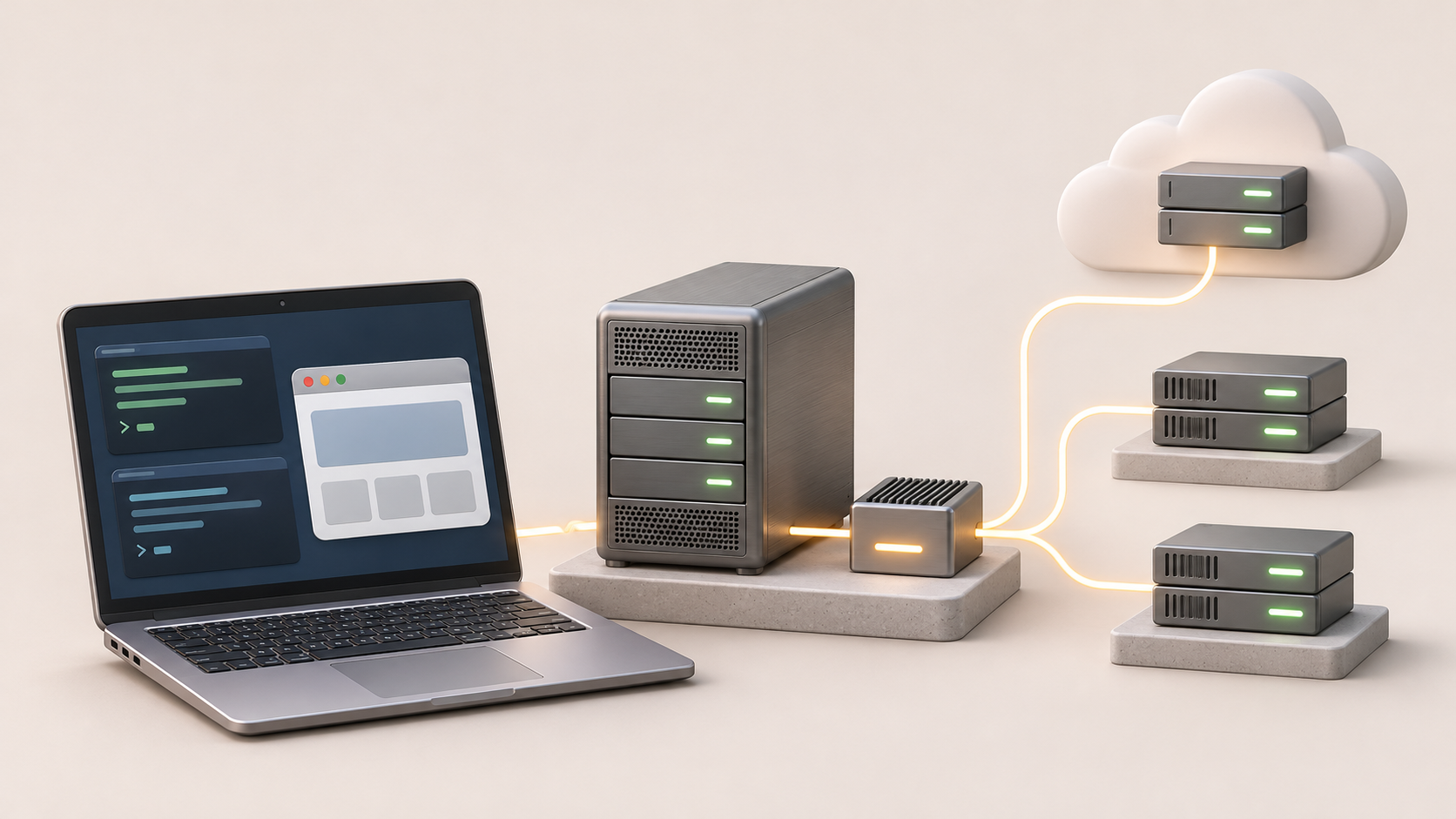
- Infrastructure control plane. The laptop applies the infrastructure definitions for a Proxmox server on premises, the UniFi network, Cloudflare, and the VPS providers I rent from, using administrative tokens loaded from the password manager. It creates the primitives — networks, storage, resource pools — and the Application Control Plane VM. It then delegates the operation of workloads to that VM, but keeps ownership of the infrastructure.
- Client. The work itself happens on the VMs, and the laptop is the window into it — a terminal or a browser app connected to sessions that live on the VM, so they keep running when the laptop is closed.
The two roles never mix in the other direction: a VM can be reached from the laptop, but workload VMs receive no administrative credentials or access to the administrative vault.
Everything Is Declared in Git
Both control planes work from Git, but they apply it differently:
| Infrastructure Control Plane | Application Control Plane | |
|---|---|---|
| Runs on | The laptop | A dedicated VM, created and owned by the Infrastructure Control Plane |
| Manages | Shared primitives: networks, storage, resource pools, shared services, provider accounts, and the Application Control Plane VM | Workloads within its pools: development and application VMs, applications, and serverless deployments |
| Applies changes | When I run it, from the reviewed main branch | Continuously, by reconciling the protected, reviewed configuration with what is running |
| Holds | Administrative tokens | Tokens scoped to the pools and services delegated to it |
| When the laptop is closed | No laptop-driven infrastructure changes are applied | Keeps reconciling |
Infrastructure changes are rare, and something has to create the first machine anyway, so the bottom layer cannot depend on a reconciler running on top of it. Everything above changes often and should not wait for my laptop to be open.
Development VMs can push proposed changes, but the Application Control Plane reconciles only the protected branch that changes reach through review. Whoever can change that branch controls what the Application Control Plane does, so merging stays with me.
The Laptop Bootstraps the Infrastructure
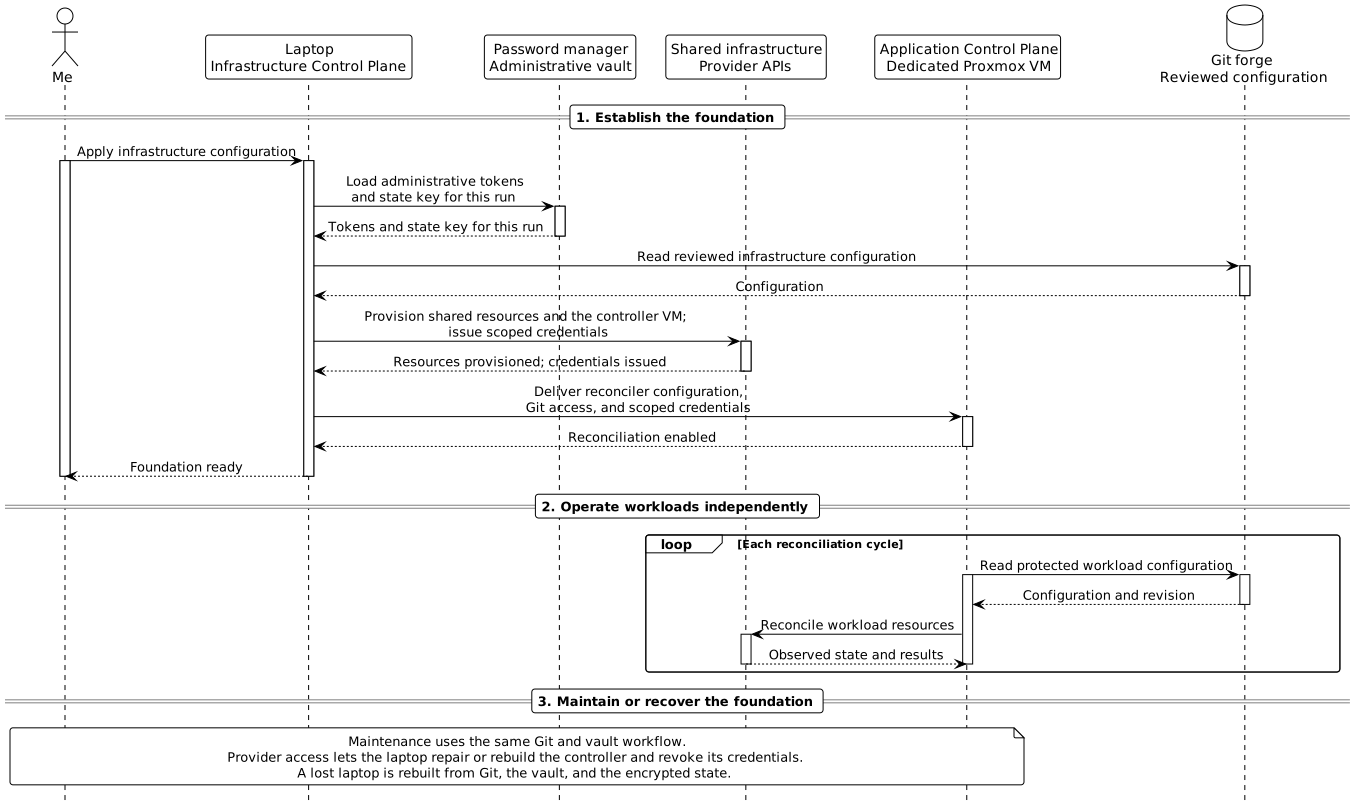
The laptop applies the infrastructure repository — with OpenTofu, which has providers for Proxmox, UniFi, Cloudflare, and most VPS providers — always from the reviewed main branch.
The administrative tokens live in a password manager, not in files on the laptop. Its command-line tool loads them into the process environment for a single OpenTofu run. OpenTofu’s state can contain secrets too, so it is encrypted, stored in object storage at a hosted provider, and its key sits in the same vault.
The password manager and the state storage are deliberately hosted services. Self-hosting them on the Proxmox server would be circular: the infrastructure would have to be running to provide what builds it — a case where renting is the right choice, in the sense of Own, Control, Rent. It also makes the laptop replaceable: a lost or broken laptop is rebuilt rather than recovered, with the definitions from Git, the secrets from the password manager, and the state from its storage.
What the laptop creates is deliberately primitive: networks and firewall rules, storage, resource pools for development VMs and application VMs, Cloudflare’s zone, DNS, Tunnels, and Access, and a project at each VPS provider. Last, it creates the Application Control Plane VM in a pool of its own, and gives it credentials scoped to its pools and to the template, storage, and network those pools need.
The controller’s credentials are kept separate from the administrative tokens, and the Application Control Plane has no access to the administrative vault. If it breaks, the laptop repairs or rebuilds it and can revoke its credentials.
The Application Control Plane Takes Over
The Application Control Plane operates what goes into the pools. It reads its desired state from the forge and reconciles continuously: creating and removing VMs, deploying applications, and rolling them back. Development VMs are declared there too, so a new project’s VM is a reviewed commit rather than a command on my laptop.
Its credentials let it create and manage VMs in its pools — but they do not authorize changes to the hosts, the networks, the other pools, or its own VM.
Resource pools define permission boundaries, not capacity. The Application Control Plane also checks the capacity limits declared in the infrastructure repository before creating a VM. Those checks prevent ordinary over-allocation, but a compromised controller would not respect them; hard limits come only from what the underlying platform enforces, such as storage of a fixed size. At the VPS providers, the Application Control Plane gets a token for its own project where the provider supports projects; where it does not, VPS machines stay with the laptop.
Where Serverless Fits
The boundary between the two control planes follows the lifecycle of a resource, not its type. What is shared and outlives any one application belongs to infrastructure: Cloudflare’s zone, DNS, Tunnels, and Access policies. What is created and removed with an application belongs to the Application Control Plane: its Workers, its Pages project, and the R2 buckets or D1 databases only it uses.
Its Cloudflare token is limited to what those products need — how narrowly depends on the product — and covers neither DNS nor Access. Publishing an application under a new public hostname is therefore an infrastructure change: the laptop adds the hostname, the Tunnel route, and the Access policy, and the Application Control Plane deploys the application behind them.
The Window into the Running Workloads
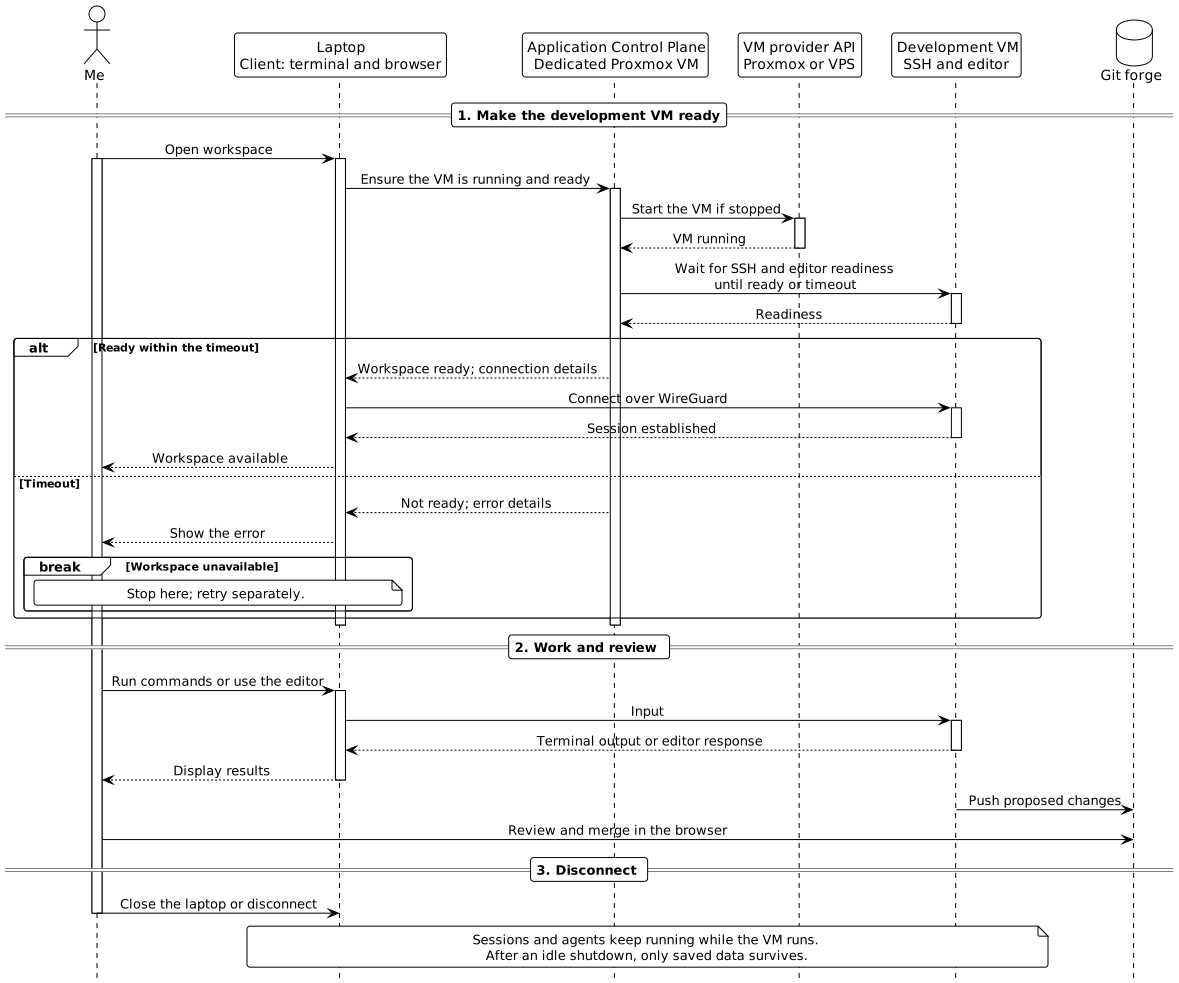
- Terminal. A shell inside a persistent remote session. Sessions and agents keep running after I disconnect.
- Browser app. A browser-based editor or an application’s own interface, served from the VM. The editor’s server, build processes, and agents run on the VM; the laptop shows only the interface.
Neither SSH nor private application ports are exposed directly to the public internet. My own access always goes through WireGuard — to the VM itself, or to the load balancer in front of a workload — whether it runs on premises or at a VPS provider. Cloudflare Tunnels serve only what is published to the public, so nothing I use myself depends on them.
Each VM has its own SSH key on the laptop. SSH agent forwarding is disabled, and administrative credentials are never sent to workload VMs.
When the Laptop Is Closed
Disconnecting leaves remote sessions and agents running, and the Application Control Plane keeps reconciling. Reconnecting resumes the work while the VM remains running. After a shutdown, only saved data survives; processes and sessions must be restored or restarted.
Idle VMs still consume resources, so the intended operating policy is declared in Git for each VM: always running, or on demand with an inactivity timeout.
- Start: the laptop asks the Application Control Plane to wake an on-demand VM.
- Stay running: the Application Control Plane polls a narrow, read-only activity endpoint on the VM for attached sessions and running agents.
- Stop: the Application Control Plane stops the VM after confirmed inactivity. Missing or failed checks do not count as idle.
Reconciliation enforces that policy rather than a fixed power state. The activity endpoint and the start request remain to be chosen.
Do you run your infrastructure from your laptop, or from somewhere else? Where do you draw the line between infrastructure and applications? Leave a comment below, or reach out through another channel if you would rather keep the conversation private. Follow the RSS feed for more.