AI agents, dependencies, and unfamiliar tools all run code on my behalf. I want to use them freely during development without exposing personal accounts, another client’s work, or production systems.
The risk is not hypothetical. In August 2026, the ChainDrop worm compromised more than 400 npm packages. Installing an affected package was enough to run it; it then stole the npm, GitHub, cloud, and SSH credentials it could find, and used stolen publishing tokens to spread to further packages. Microsoft and Unit 42 have published detailed analyses.
That requires two decisions: what isolates the code, and where that development environment runs. From those decisions follows a third: what files, credentials, and connections each environment receives.
This decision covers development environments. They must have no direct access to deployed test or production systems. Tests and supporting services run within development.
1. Isolation Options
The requirements are straightforward: support normal development tools, run several projects independently, let agents work without constant approval, and limit the damage if something goes wrong.
These options can be combined: sandboxes and containers restrict execution, VMs separate operating systems, and separate hardware moves workloads away from the workstation.
| Option | Boundary | Limitation | Suitable use |
|---|---|---|---|
| Direct execution | None beyond the user’s existing permissions | Code can access whatever that user can access | Applications I deliberately trust with workstation access |
| Process sandbox | Restricts a process’s file and network access | Protection depends on the policy and permissions granted | Confining individual tools and commands |
| Container | Separates files, processes, and tooling while sharing a kernel | Shared kernel; mounted home directories, broad credentials, and the runtime’s control socket can expose the host (Docker security) | Reproducible project tooling |
| Browser sandbox | Runs supported tooling within the browser’s restrictions | Limited support for native tools and services | Quick experiments in supported stacks |
| Virtual machine | Separate operating system and kernel | More memory, storage, and maintenance | Complete environments where code needs broad permissions inside |
| Separate physical machine | Moves execution away from the laptop’s hardware | Does not separate workloads on that machine | Moving workloads away from a personal workstation |
Python virtual environments and similar dependency tools solve a different problem: they prevent package conflicts, but code inside them can still read whatever my account can.
Examples of each option: Seatbelt on macOS, Bubblewrap, and Firejail are process sandboxes; Docker, Podman, and dev containers are containers; StackBlitz WebContainers run in the browser.
VM tooling includes local managers such as Lima, Colima, and UTM; server platforms such as Proxmox VE and XCP-ng; and packaged agent environments such as Docker Sandboxes, which use microVMs rather than ordinary Docker containers.
These are implementation examples, not endorsements of their default configuration. Lima shares the host’s home directory read-only by default, and Colima mounts it writable (Lima, Colima) — and read-only access still exposes readable secrets. Host-directory sharing, credential forwarding, and network access must be configured to match the access rules below.
2. Isolation Decision
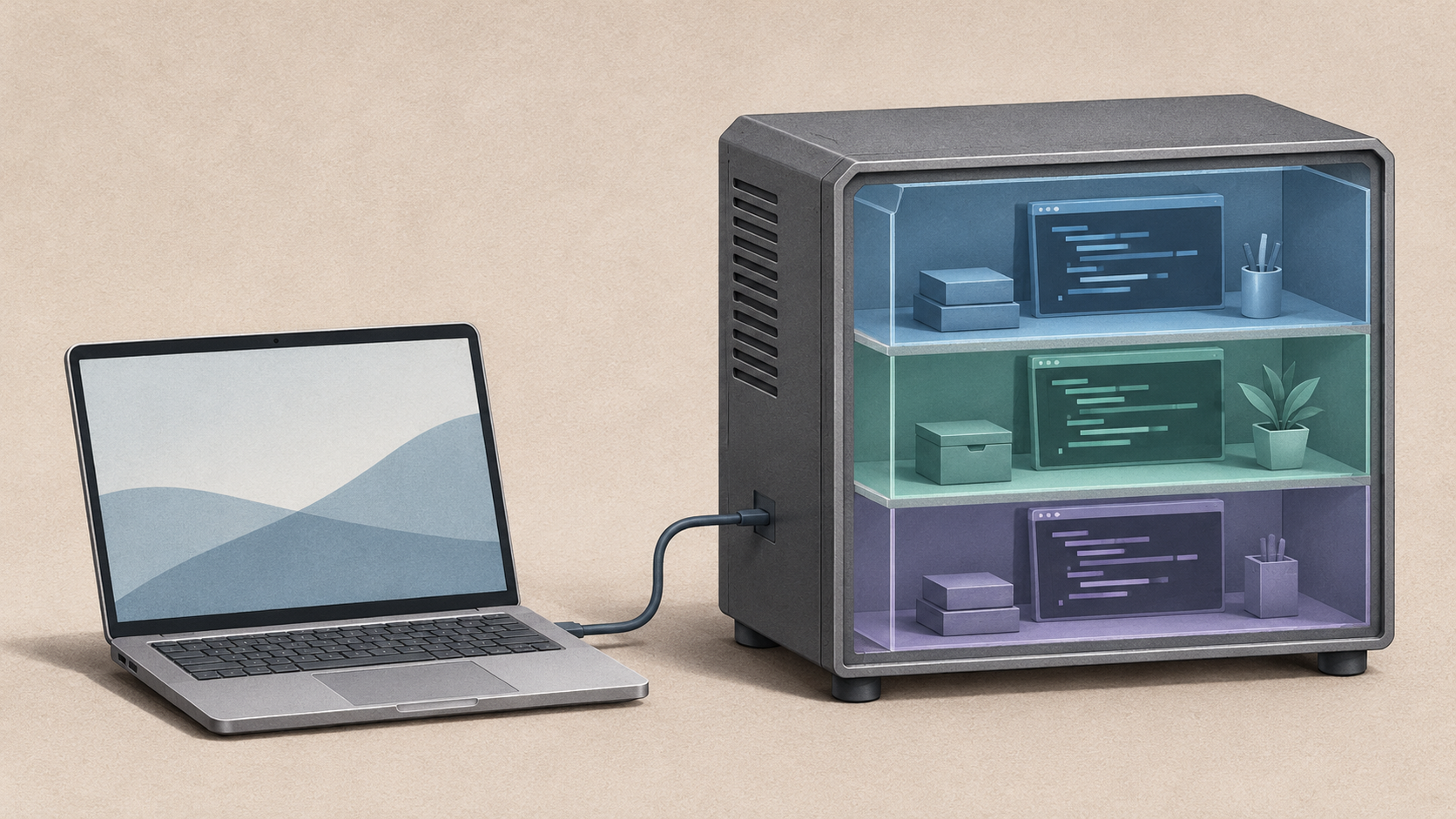
My default is one development VM per project, and no VM is ever shared between clients. Independent agent tasks can use disposable VMs when they need their own state. The boundary applies from the first dependency installation: package installation, project setup, builds, tests, and agent commands all run inside the development VM.
I choose a separate guest kernel as the primary boundary and accept the additional memory and maintenance cost. This lets me grant administrative permissions inside a development VM without granting administration of its host. Containers provide reproducible tooling within that boundary; process sandboxes can further restrict individual commands.
3. Deployment Options
There is a laptop in every arrangement. The question is where the development VMs run.
| Arrangement | Where development runs | Main trade-off |
|---|---|---|
| On the laptop | Local VMs | No extra machine, but the laptop must be powerful enough for several environments, and work depends on the laptop staying awake |
| On an owned server | VMs on a server I own | Frees the laptop and keeps work running, but the server is mine to maintain |
| On rented infrastructure | Cloud VMs or cloud development environments | Easy resizing and no hardware to repair, but ongoing costs for environments that run all day, and provider dependence |
Local VMs remain a valid isolation choice. Moving them to a server does not automatically strengthen their VM boundary. It does move experimental workloads away from the laptop and gives them resources independent of its battery and availability.
Cloud deployment can provide the same separation from the laptop. Ownership is a cost, custody, and operating responsibility decision — not a general security ranking.
4. Deployment Decision
I will run development VMs on an owned server.
Two considerations decide it.
Development should continue without the laptop. Builds, services, and agent tasks should keep running when I close the lid. A server also lets several environments run without determining the size and weight of my next laptop.
The server will exist anyway. Other workloads already justify owning, powering, and maintaining it. I therefore compare the additional capacity and operating cost of development with rented environments. At my expected usage, that should favour the owned server.
Ownership makes patching, backups, and recovery my responsibility. That follows the trade-offs in Own, Control, Rent, with I Took Self-Hosting Too Far as a reminder of the effort involved. The Infrastructure Control Plane is intended to keep that choice portable between owned hardware and the cloud.
Because the server also runs those other workloads, sharing it leaves hardware failure and host compromise as shared risks. Development must have externally enforced network restrictions and resource limits, with no access to host administration. Workloads requiring protection from that shared failure domain need separate hardware.
5. What Stays on the Laptop, and What VMs Receive
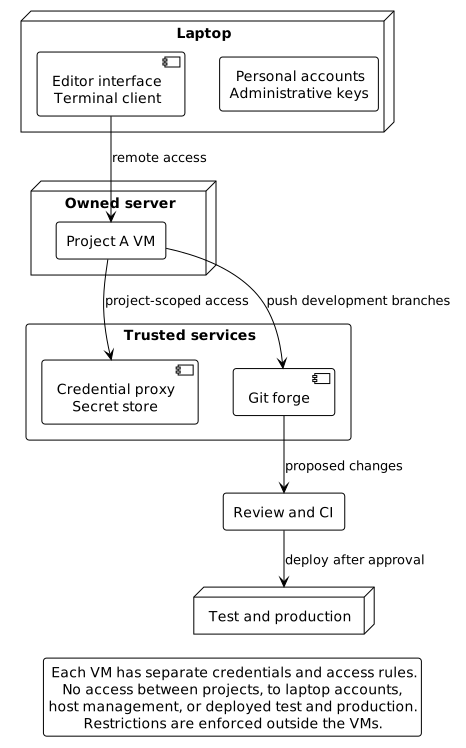
The allocation follows one rule: a development VM receives what its project needs, rather than inheriting my access.
| Part of the setup | On the laptop | In the development VM |
|---|---|---|
| Editor or IDE | The interface and interface-only extensions, connected remotely | Workspace extensions, language servers, debuggers, and project tooling (extension hosts) |
| Terminal | The terminal client | Shell sessions that keep running when I disconnect |
| Agents | Control interface and maintained configuration | The agent process, every command it runs, and read-only copies of its configuration |
| Model provider tokens | — | Proxy access where supported; otherwise scoped credentials |
| Project secrets | Secret-store administration | Injected at runtime, scoped and short-lived, never in the repository |
| Git | Personal and signing keys; review and merge | Own clone and repository-scoped credentials; no forwarded SSH agent |
| Toolchains | Only what the editor needs | Compilers, package managers, container runtimes, and local databases, installed from an allowlisted registry or mirror |
| Development servers | The browser, through forwarded ports | The running services |
| Personal and administrative access | Password manager, browser sessions, email, documents, and infrastructure administration | None |
| Network | What I need to work and administer | Allowed services only; no other clients, test, production, or host management |
Some parts of the setup live in neither column. The credential proxy, the project secret store, network enforcement, and the forge are trusted services outside the development VMs — not necessarily on the laptop. They remain available when the laptop sleeps, allowing agent tasks to continue.
Work comes back through Git. The VM pushes to its own branches, and changes reach the main branch only through a reviewed pull request, before following the normal path to test and production. Forge rules — not anything inside the VM — restrict it to development branches and prevent merging or changing repository settings.
Isolation limits what the code can access; it does not make the resulting changes trustworthy, which is why every change is reviewed. Pushed code can still trigger automation before it is merged, so unreviewed branches never receive deployment credentials or privileged CI access.
Credentials. Where a client and API support it, a credential proxy outside the VM keeps the real token there and gives the VM only a placeholder. Secrets supplied directly to the VM must be treated as accessible to an agent with administrative permissions inside it. Network rules, enforced outside the VM, restrict which services it can reach; limiting how much it can use them requires usage controls in the proxy or at the provider. An agent can still abuse whatever access both permit, so access is scoped to the project and, where available, capped by usage budgets.
Production secrets and data never enter development, following Room to Experiment, Confidence to Release.
Configuration. Read-only agent settings protect the files from modification; they do not force a fully privileged agent process to follow them.
6. Consequences for Hardware
The laptop needs portability, battery life, a good screen and keyboard, and enough capacity for an editor, browser, and occasional local VM. Remote development introduces a connection dependency; local VMs remain an option for offline work.
The server needs enough memory and CPU for concurrent development VMs, reliable storage, backups, and remote management. It can also host other workloads, as long as development has enforced resource limits.
This decision establishes the boundaries and access rules for development; how to implement them is a separate question.
How do you isolate unfamiliar code? When are sandboxes or containers enough, and when do you reach for a VM or a separate machine? Leave a comment below, or reach out through another channel if you would rather keep the conversation private. Follow the RSS feed for more.