The Problem Worth Solving
Somewhere in most organizations, there is a diagram that was accurate at some point. It was exported as an image and dropped into a wiki or a slide deck. The system has changed since then — nobody tracked when, or why. There is no diff, no commit message, no way to tell. To update it, someone has to find the original file, hope the tool is still accessible, manually reposition elements, re-export, and replace the image. The cost is always slightly higher than the immediate need. So it quietly falls behind.
Diagrams as code applies an idea that the web, typesetting, and structured publishing figured out long before diagramming tools existed: separate the content from its rendering. HTML describes structure; CSS handles presentation. LaTeX describes the document; the engine produces the layout. The same principle works for diagrams — you write a text definition, and a renderer produces the visual output from it. The definition lives in version control, travels through pull requests, and can be edited years later without touching a canvas or repositioning a single element.
It won’t fix everything. A text-based diagram can drift from reality just as quietly as an exported image — that is a process and culture problem, and no file format solves it. What it does address is the tooling friction: it lowers the cost of the update itself and treats the diagram as a first-class artifact that humans and AI can read, write, diff, and review alongside the rest of the codebase.
- Every change becomes traceable. A diagram in version control gets a commit, a date, and an author. You can see what the architecture looked like at any point in time, who changed it, and — if the PR is written well — why.
- The source outlives the tool. A Visio file or Lucidchart export is tied to a vendor — when pricing changes, features disappear, or the license lapses, the diagram becomes uneditable. A text file in an open format has none of those dependencies.
- Bulk changes are trivial. Rename a service, update a naming convention, or apply a structural change — once, with a script or a find-and-replace, across a single diagram or every diagram in the repository. Try doing that with a folder of exported images.
- Humans and AI can both work with it. A text definition can be read, written, and modified by people and AI tools alike. Ask an AI to generate a diagram from a description, flag a discrepancy, or explain what it shows. None of that works on a binary image.
- Diagrams can be derived, not authored. When the definition is text, a tool can generate it — source code into dependency graphs, database schemas into ER diagrams, Terraform and Kubernetes manifests into infrastructure diagrams, OpenAPI and AsyncAPI specs into sequence diagrams. No person needs to draw it; the diagram becomes an output of existing data, computed and rendered on demand.
How It Works
The core idea is simple enough to state in a sentence: write a text definition, run a renderer, get an image. In practice, the workflow looks like this:
- Install your chosen tool
- Open any text editor and write a plain text definition — the diagram source
- Run a renderer against it to produce the image
- Review the output and adjust the source as needed — text edits are immediate, and the renderer can be re-run in seconds
- Reference the output from your documentation — embed the rendered image, or write the source in a format the platform renders inline without a separate file
- Commit the source to version control — the rendered image can be committed alongside it, regenerated by a pipeline on every change, or rendered automatically by the platform
The image becomes a build artifact, not the thing you author.
So what does one of these text definitions actually look like? Here is a simplified domain model written in PlantUML — one of the tools covered in the next section. The source definition comes first; the rendered output follows.
The source definition:
@startuml domain-model-example
!theme plain
skinparam roundcorner 6

class Order {
  +id: Long
  +status: OrderStatus
  +createdAt: DateTime
  +userId: String
}

class OrderItem {
  +productId: String
  +quantity: Int
  +unitPrice: Decimal
}

class User {
  +id: String
  +email: String
}

enum OrderStatus {
  PENDING
  CONFIRMED
  SHIPPED
  DELIVERED
}

User "1" --> "0..*" Order : places
Order "1" *-- "1..*" OrderItem : contains
Order --> OrderStatus : has

@enduml
The rendered output:
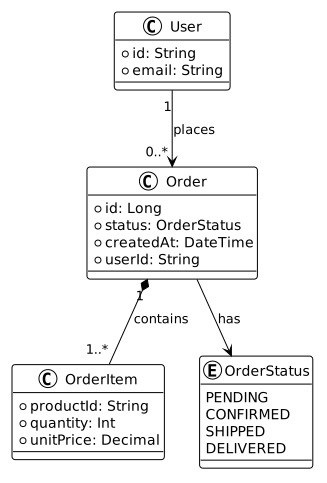
The diagram above came entirely from describing relationships and attributes — there was no layout work, no symbol selection, no annotation placement. The composition diamond, the association arrows, the multiplicities at each end of each relationship — all of that is a consequence of the semantics encoded in the text. The renderer knows what *-- means and draws it accordingly. You describe the model; the tool handles the notation.
Picking the Right Tool
The landscape here is broader than most people expect. There are tools for general-purpose diagramming, tools purpose-built for specific diagram types, and tools designed around a particular notation standard. Some have been around for decades; others are still finding their footing. Picking the right one is less about finding the “best” tool and more about understanding which trade-offs matter for your context.
To cut through the noise, I have picked six dimensions that I find most useful when evaluating these tools:
Dimensions
| Dimension | What it tells you |
|---|---|
| Diagram types | Breadth of coverage — full UML surface, a focused set, or single-purpose |
| Visual control | Layout positioning (auto-layout to explicit coordinates), themes, CSS overrides, and notation variants |
| Rendering model | Inline at runtime (no build step) vs pre-rendered image you embed |
| Setup | The friction to get started — local tooling, dependencies, and first-run complexity |
| Maturity | Stability, community size, and longevity |
| Ecosystem | Platform integrations, plugins, and documentation toolchain support |
Tool Comparison
| Tool | Diagram types | Visual control | Rendering model | Setup | Maturity | Ecosystem |
|---|---|---|---|---|---|---|
| PlantUML | 27 — full UML surface plus ArchiMate, network, wireframe, Gantt, mindmap, WBS, and more; C4 via extensions | Auto-layout with directional hints; skinparam theming and built-in themes | Pre-rendered | JRE required | Mature | Very good — Sphinx, Antora, AsciiDoc, Confluence, VS Code, IntelliJ, MkDocs |
| Mermaid | 30* — flowchart, sequence, class, state, ER, Gantt, gitGraph, mindmap, timeline, kanban, architecture, and more | Minimal — direction hints only (TB, LR, RL, BT); theme variables and CSS class overrides | Inline & pre-rendered | Zero for inline; npm for CLI pre-rendering | Established | Excellent — GitHub, GitLab, Notion, Confluence, Obsidian, Docusaurus, VitePress, Azure DevOps, and more |
| D2 | ~6 — flowchart, sequence, class, ER, architecture | Direction hints and pluggable layout engines; CSS theming and sketch mode | Pre-rendered | Single binary | Growing | Limited — build-step workflows |
| Structurizr DSL | C4 views — context, container, component, deployment | Auto by default, manual x/y positioning; limited theming | Pre-rendered / hosted | CLI or hosted service | Established | Good — CLI, Backstage plugin, hosted service |
| BPMN.io | BPMN, DMN (decision tables), CMMN (case management) | Primarily WYSIWYG; reads and writes standard XML (BPMN, DMN) — files can be version-controlled, diffed, and rendered in supporting platforms | Inline (browser-native) | Browser-native | Mature | Good — web-first |
| Diagrams (mingrammer) | Cloud infrastructure — AWS, GCP, Azure, Kubernetes | Explicit positioning via Python; uses provider icon sets | Pre-rendered | Python + pip | Stable | Python environments only |
| Nomnoml | Basic UML | Minimal layout; basic customization via directives | Inline & pre-rendered | Browser / npm | Stable | Minimal |
| WaveDrom | Digital timing / waveform diagrams | Fixed waveform layout; signal styling options | Inline & pre-rendered | npm / CDN / browser | Stable | Limited — hardware and embedded docs |
| DBML | Database schema / ER diagrams | Auto layout; minimal styling options | Pre-rendered / hosted | npm / online editor | Growing | Limited — dbdiagram.io, some CI integrations |
* Diagram type counts reflect what each tool formally lists. Mermaid’s 30 includes a significant number of experimental and niche types (Wardley, Cynefin, Venn, Ishikawa, etc.) — the production-stable core is closer to 15. PlantUML’s 27 are generally more stable across the board.
A note on Kroki
Kroki is worth a brief mention because it appears alongside these tools in most comparisons. It is not a diagramming language — it is a rendering proxy that routes source definitions to other tools (PlantUML, Mermaid, D2, Graphviz, and more) and returns an image. The dimensions in the table above do not apply to it; what you get depends entirely on the backend it calls. It trades per-tool installation for a service dependency, which shifts the operational concern rather than removing it.
Where This Leaves Us
The table is a reference, not a ranking. Most teams need one or two tools, not nine. The dimensions help narrow the field: if the team already works in GitHub, Notion, or Obsidian, rendering model and ecosystem are the deciding columns — Mermaid becomes the obvious starting point. If breadth of UML coverage and toolchain depth matter, diagram types and maturity lead — PlantUML. If explicit visual control and cleaner syntax are the priority — D2. If the team has adopted C4 as its architecture model — Structurizr. No single tool handles everything well, and that is fine.
The more important shift is in how diagrams are produced. When the definition is text, they stop being something a team maintains and start being something a system can generate — from source code, infrastructure manifests, API specs, or database schemas. Documentation that used to trail behind the system can instead be derived from it. That changes the relationship between a diagram and the thing it describes.
Diagrams as code is one expression of a broader principle: that every artifact of a digital solution — code, configuration, infrastructure, documentation, and diagrams — belongs in version control, follows the same review process, and changes alongside the thing it describes. I will be coming back to this in more depth — including how the different diagram types map to the Ten Views of a Digital Solution, and how it fits into the wider Digital Solution Lifecycle Tooling practice I am building out.
Is your team’s documentation the last thing that gets updated — diagrams nobody trusts, architecture that lives in one person’s head?
Let’s get in touch to discuss how a diagrams-as-code practice changes that, and what it takes to make documentation something the system produces rather than something the team maintains.
I will be writing more on how this fits into an Everything as Code practice — version control, pipelines, and documentation all treated as first-class engineering concerns.
Follow my RSS feed to catch it when it lands.